If you are just starting with C programming, one of the first things you need to learn is how to repeat actions without writing the same code over and over again. That is exactly what a for loop does. It lets your program run a block of code multiple times, automatically.
In this article, you will learn what a for loop is, how it works, and how to use it in a real program — including a working example that calculates the average marks of five students.
What Is a For Loop in C?
A for loop is a control structure in C that repeats a block of code a specific number of times. You tell it where to start, when to stop, and how to move forward — and it handles the rest.
Here is the basic structure:
for (initialization; condition; update) { // code to repeat}
Let’s break that down:
- Initialization — This runs once at the start. You usually set a counter variable here, like
i = 0. - Condition — Before each repetition, C checks this condition. If it is true, the loop runs. If it is false, the loop stops.
- Update — After each repetition, this part runs. You usually increase or decrease your counter here, like
i++.
A Real Example: Calculating Average Marks
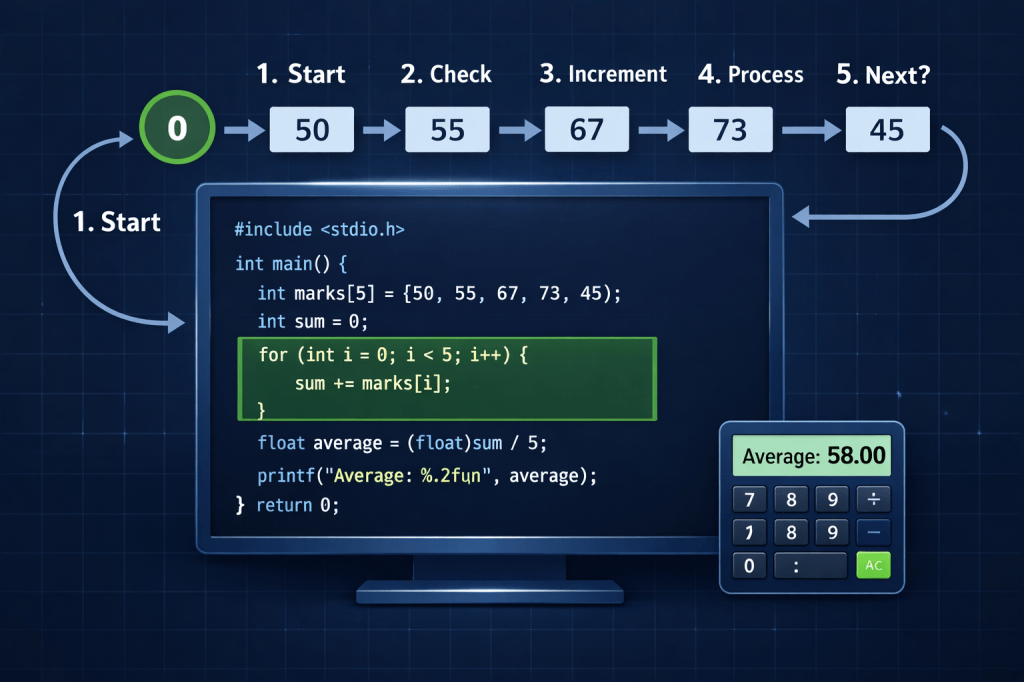
Now let’s look at a real program. The image above shows a C program that stores the marks of five students in an array and then uses a for loop to calculate their average.
Here is the code:
#include <stdio.h>int main() { int marks[5] = {50, 55, 67, 73, 45}; int i, sum = 0; float avg; for (i = 0; i < 5; i++) { sum += marks[i]; } avg = (float)sum / 5; printf("Average: %.2f", avg); return 0;}
Let’s walk through this step by step.
Step-by-Step Explanation
Step 1: Declare and initialize the array
int marks[5] = {50, 55, 67, 73, 45};
This line creates an array called marks that holds five integer values: 50, 55, 67, 73, and 45. An array is simply a list of values stored under one name. If you want to learn more about arrays, check out this detailed guide: What Are Arrays in C Programming? A Beginner’s Complete Guide
Step 2: Set up variables
int i, sum = 0;float avg;
Here, i will be used as the loop counter, sum starts at zero and will hold the running total, and avg will store the final average as a decimal number.
Step 3: The for loop runs
for (i = 0; i < 5; i++) { sum += marks[i];}
This is the heart of the program. Let’s trace through it:
i = 0— the loop starts withiequal to 0i < 5— the loop runs as long asiis less than 5i++— after each run,iincreases by 1
So the loop runs exactly 5 times — once for each student. Each time, it adds the current mark to sum:
| Loop Run | i | marks[i] | sum |
|---|---|---|---|
| 1st | 0 | 50 | 50 |
| 2nd | 1 | 55 | 105 |
| 3rd | 2 | 67 | 172 |
| 4th | 3 | 73 | 245 |
| 5th | 4 | 45 | 290 |
After 5 runs, sum equals 290.
Step 4: Calculate and print the average
avg = (float)sum / 5;printf("Average: %.2f", avg);
The (float) part is called type casting. Without it, dividing two integers in C would give you an integer result and drop the decimal. By casting sum to a float first, you get an accurate decimal answer.
290 ÷ 5 = 58.00
The program prints: Average: 58.00
Why Use a For Loop Instead of Writing Each Line?
Imagine if you had 100 students instead of 5. Without a loop, you would have to write 100 lines just to add up the marks. With a for loop, the same 3 lines handle any number of students. This is the real power of loops — they save time, reduce errors, and make your code cleaner.
Common Mistakes Beginners Make with For Loops
1. Starting the index at 1 instead of 0 Arrays in C start at index 0, not 1. If your array has 5 elements, they are at positions 0, 1, 2, 3, and 4. Using i = 1 would skip the first element.
2. Using <= instead of < Writing i <= 5 instead of i < 5 would make the loop run 6 times, and on the 6th run, it would try to access marks[5] — which does not exist. This is called an out-of-bounds error and can crash your program.
3. Forgetting to update the counter If you forget i++, the loop will run forever — this is called an infinite loop and will freeze your program.
Practicing For Loops Further
The best way to master for loops is to use them in small projects. Try modifying the program above to find the highest mark, the lowest mark, or to print all marks one by one. Each small experiment builds your understanding fast.
For more beginner-friendly C programming tutorials and coding lessons, visit the YouTube channel where complex topics are broken down into simple, step-by-step videos.
Key Takeaways
The for loop is one of the most useful tools in C programming. Once you understand how initialization, condition, and update work together, you can use loops to solve a wide range of problems — from calculating averages to processing large sets of data. The example in this article is a perfect starting point: simple, practical, and easy to modify as your skills grow.
Keep practicing, keep experimenting, and soon for loops will feel completely natural.
 WEBRONAQ.COM