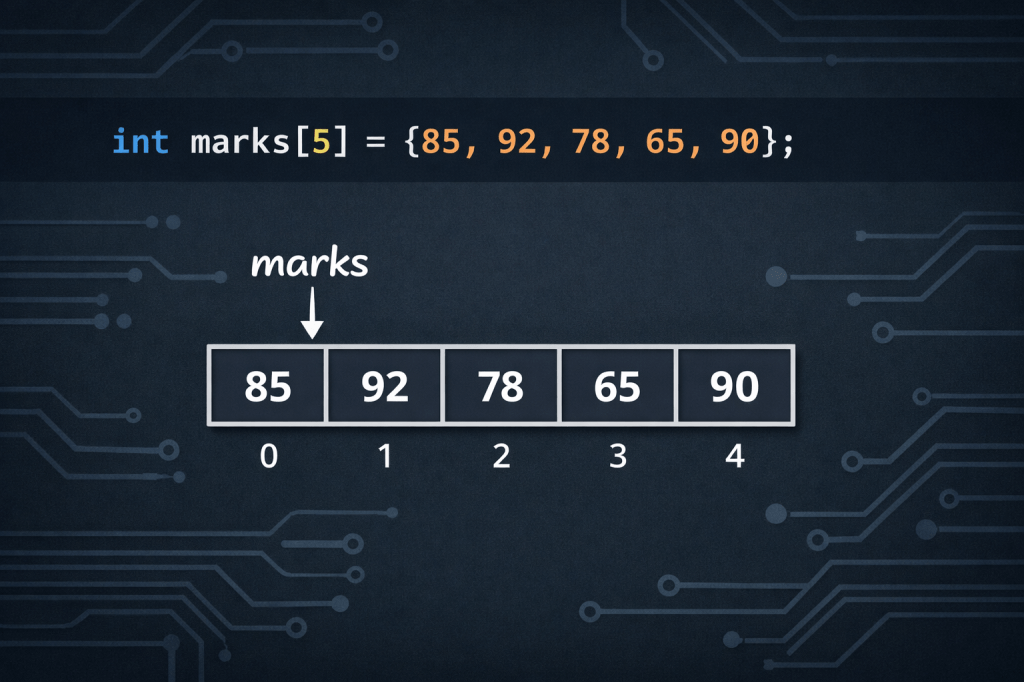
If you have ever tried to store the scores of 30 students, the temperatures of 12 months, or the prices of 100 products in a C program, you quickly realize that creating a separate variable for each value is painful. That is exactly the problem arrays were built to solve. Arrays are one of the most important concepts in C programming, and once you understand them, your code becomes cleaner, shorter, and far more powerful.
What Is an Array in C?
An array in C is a collection of data items of the same data type. These values are stored in contiguous memory locations and can be accessed using a single variable name. Think of it like a row of numbered boxes. Each box holds one value, and you can reach any box directly by using its number.
It is important to note that the size and type of an array cannot be changed once it is declared. So before using an array, you need to decide how many elements you want to store and what type they are — integers, floating-point numbers, or characters.
Why Use Arrays?
Suppose you want to store the marks of 10 students and find the average. Without arrays, you would declare 10 different variables. These variables would be scattered in memory with no relation between them. If you then wanted to extend the problem to 100 students, it becomes impractical to declare so many individual variables. Arrays offer a compact and memory-efficient solution.
How to Declare an Array in C
The basic syntax for declaring an array is:
data_type array_name[size];
For example:
int marks[10];
This creates an array called marks that can hold 10 integers. You can also declare and initialize an array at the same time:
int marks[5] = {50, 55, 67, 73, 45};
If an array is to be completely initialized, the dimension of the array is not required. The compiler will automatically size the array to fit the initialized data. So this is also valid:
int marks[] = {50, 55, 67, 73, 45};
How Array Indexing Works
Arrays have 0 as the first index, not 1. The first element is mark[0], the second element is mark[1], and so on. If the size of an array is n, to access the last element, the n-1 index is used.
So if you declare int scores[5], the valid indexes are 0, 1, 2, 3, and 4. Trying to access scores[5] goes out of bounds. This leads to undefined behavior and can crash your program or corrupt memory. Always stay within the declared size.
A Practical Example: Finding the Average
Here is a simple, real-world use of arrays — calculating the average of student marks:
#include <stdio.h>int main() { int marks[5] = {50, 55, 67, 73, 45}; int i, sum = 0; float avg; for (i = 0; i < 5; i++) { sum += marks[i]; } avg = (float)sum / 5; printf("Average: %.2f", avg); return 0;}
This program loops through all five values using a for loop, adds them up, and then divides by the total count. Without arrays, you would need five separate variables and five separate lines just to add them up.
Accessing and Updating Elements
Arrays in C provide random access to their elements, meaning you can access any element by providing its index position.
To read an element:
printf("%d", marks[2]); // prints the third element
To update an element:
marks[0] = 95; // changes the first element to 95
Looping Through an Array
For array traversal in C, loops are used to iterate through each element of the array. Here is how you print all elements and then print them in reverse:
int arr[5] = {2, 4, 8, 12, 16};// Forwardfor (int i = 0; i < 5; i++) { printf("%d ", arr[i]);}// Reversefor (int i = 4; i >= 0; i--) { printf("%d ", arr[i]);}
This pattern — looping forward or backward through an array — is used constantly in real programs for sorting, searching, and processing data.
Finding the Size of an Array
The array does not contain information about its size, but you can extract it using the sizeof() operator. Here is the standard way to do it:
int size = sizeof(arr) / sizeof(arr[0]);
This divides the total memory used by the array by the memory used by a single element, giving you the number of elements.
Types of Arrays in C
There are three types of arrays in C: one-dimensional arrays, two-dimensional arrays, and multidimensional arrays.
One-dimensional arrays are the simplest — just a single row of values, like int scores[5].
Two-dimensional arrays work like a table with rows and columns. They are great for representing things like a grid or a matrix:
int grid[3][3] = { {1, 2, 3}, {4, 5, 6}, {7, 8, 9}};
Multidimensional arrays go beyond two dimensions and are useful for complex data like 3D models or scientific simulations.
Common Mistakes to Avoid
One of the most common errors beginners make is going out of bounds — accessing an index that does not exist. All arrays in C can only store elements of the same data type. You cannot mix different types, like integers and characters, in the same array.
Another mistake is forgetting that indexing starts at 0. If your array has 5 elements, the last one is at index 4, not 5.
Key Takeaways
Arrays are a foundational tool in C programming. They let you group related data together, loop through it efficiently, and write programs that scale — whether you are handling 5 values or 5,000. Once you master one-dimensional arrays, moving to two-dimensional arrays and beyond becomes much easier.
If you want to go deeper into C programming and other programming concepts with clear, beginner-friendly explanations, check out the resources available on YouTube. You will find tutorials designed to make even the toughest concepts simple and approachable.
 WEBRONAQ.COM