If you use WordPress, chances are you have come across two Google tools that sound similar but work very differently: Site Kit by Google and Google Tag Manager (GTM). I have seen many website owners confuse the two, install the wrong one, or even skip both because they are unsure which tool does what. In this article, I, Shafaat Ali, will break down the difference between Site Kit and Google Tag Manager in simple terms so you can decide which one fits your needs.
What Is Site Kit by Google?
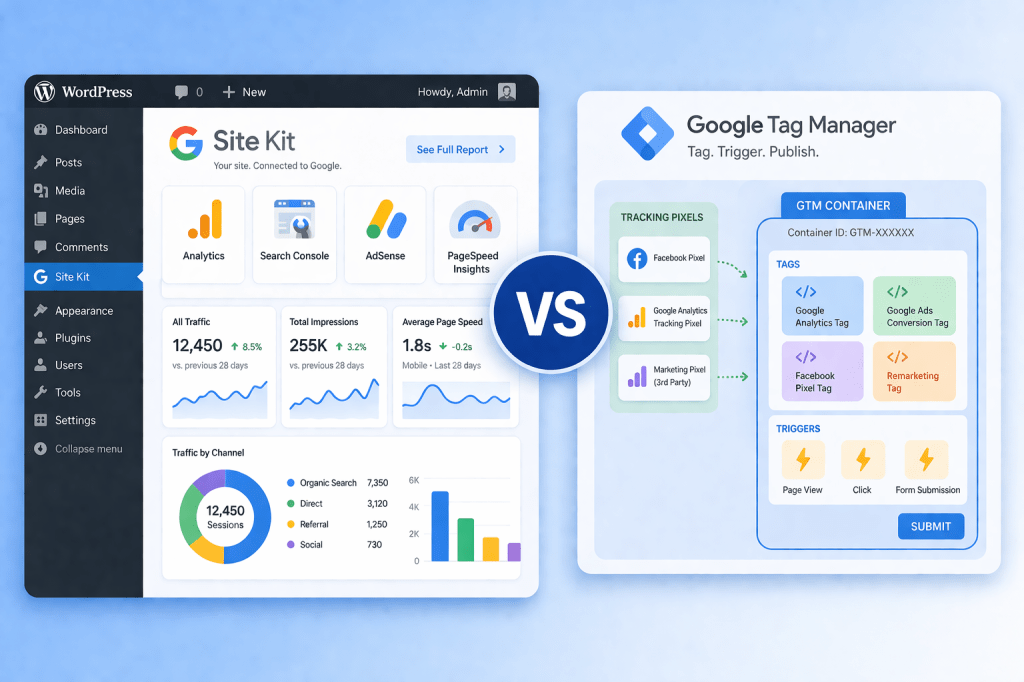
Site Kit is the official WordPress plugin from Google. Think of it as a dashboard that brings data from multiple Google services into your WordPress admin panel. Instead of logging into Google Analytics, Google Search Console, Google AdSense, and PageSpeed Insights separately, Site Kit lets you see key numbers from all these tools in one place without leaving WordPress.
Here is what Site Kit connects to: Google Analytics, Google Search Console, Google AdSense, Google Tag Manager, PageSpeed Insights, Google Ads, and Reader Revenue Manager. The plugin is free, and as of 2026, it has over five million active installations on WordPress sites worldwide.
The biggest advantage of Site Kit is simplicity. You install the plugin, sign in with your Google account, and it walks you through connecting each service. There is no code to paste, no files to edit, and no developer required. For example, if you want to see how many people visited your site last week, which search queries brought them to your pages, or how fast your site loads on mobile, Site Kit shows all of that right inside WordPress.
However, Site Kit is primarily a reporting and setup tool. It helps you view data and connect Google services, but it does not give you deep control over how tracking works on your site.
What Is Google Tag Manager?
Google Tag Manager is a completely different tool. It is a tag management system that lets you add, update, and manage tracking codes (called tags) on your website through a web-based dashboard. These tags can be for Google Analytics, Google Ads conversion tracking, Meta Pixel, TikTok Pixel, or any custom tracking script.
Before GTM existed, every time you wanted to add a tracking code to your website, a developer had to edit the site’s source code. This was slow and risky. GTM changed that by letting you install one container snippet on your site. After that, you manage everything through the GTM interface.
In 2026, Google Tag Manager is used on over 46 percent of all websites, and it holds more than 99 percent of the tag management market share. It has also grown more powerful with features such as server-side tagging, Consent Mode for privacy compliance, and AI-powered tag recommendations.
For example, suppose you are running a Google Ads campaign and want to track when someone submits a contact form on your site. With GTM, you create a tag for conversion tracking, set a trigger that fires when the form is submitted, and publish it. No code editing needed. If you later want to add a Meta Pixel for Facebook ads, you simply add another tag in the same GTM container.
I have written a detailed, step-by-step guide on how to use Google Tag Manager in your WordPress.com or WordPress.org website that I recommend reading if you want to set up GTM on your own site.
The Core Difference
Here is the simplest way to understand it: Site Kit is for viewing data. Google Tag Manager is for collecting data.
Site Kit brings reports and insights into your WordPress dashboard. Google Tag Manager controls what tracking codes run on your website and when they fire. They serve different purposes, and one does not replace the other.
Think of it this way. If your website were a restaurant, Google Tag Manager would be the kitchen where meals are prepared. Site Kit would be the menu display that shows you what is being served. The kitchen does the actual work, while the display gives you a quick overview.
Can You Use Both Together?
Absolutely. In fact, using both together is a common and recommended setup. Here is how it works in practice:
You install Site Kit on your WordPress site. During setup, Site Kit offers to connect Google Tag Manager for you. It adds the GTM container code to your website automatically, so you do not have to paste any snippets manually. From there, you manage all your tracking tags inside the GTM dashboard, and you view the resulting data inside Site Kit on your WordPress dashboard.
This combination gives you the best of both worlds. GTM handles the technical side of tracking, while Site Kit gives you a quick, code-free way to see how your site is performing.
When Should You Use Site Kit Alone?
If you run a simple blog or a small business website and only need basic tracking with Google Analytics and Search Console, Site Kit alone may be enough. It can set up Google Analytics on your site without GTM, and it gives you a clean summary of traffic, search performance, and page speed. You do not need advanced event tracking or multiple marketing pixels for this kind of setup.
When Do You Need Google Tag Manager?
You need GTM when your tracking requirements go beyond basic page views. Here are some common scenarios where GTM becomes essential: you are running paid advertising on Google, Meta, or TikTok and need conversion tracking; you want to track specific user actions like button clicks, form submissions, file downloads, or video plays; you work with multiple marketing tools that each require their own tracking code; you need to comply with privacy regulations using consent-based tracking; or you want to make changes to your tracking setup quickly without waiting for a developer.
A Common Mistake to Avoid
One mistake I see often is people installing both Site Kit with Google Analytics connected and adding a separate Google Analytics tag through GTM. This creates duplicate tracking, which inflates your traffic numbers and corrupts your data. If you use GTM to deploy Google Analytics, make sure Site Kit is not also placing its own Analytics code, or vice versa. Choose one method to deploy Analytics and stick with it.
Key Takeaways
Site Kit by Google and Google Tag Manager are both free tools from Google, but they solve different problems. Site Kit is a WordPress plugin that simplifies connecting Google services and displays reports inside your dashboard. Google Tag Manager is a tag management system that lets you control all your tracking codes from one place without editing your site’s source code. You can and should use them together for a clean, powerful setup, but always be careful not to duplicate your tracking.
If you want to learn more about topics like these, you can explore my books on Apple Books for in-depth guides. For video tutorials, subscribe to my YouTube channel. You can also connect with me on X and LinkedIn.
 WEBRONAQ.COM